

কর্মচারী আর কে কী দেখতে পাবেStaff, and who may see what
কর্মচারী যোগ করা আর তাদের অনুমতি ঠিক করা। প্রত্যেকের আলাদা লগইন থাকলে কোন বিক্রি কে করেছে দেখা যায়, আর কেউ চলে গেলে মুছে না ফেলে বন্ধ করে দেওয়া যায়।Adding staff and setting what each of them can do. Separate logins show who sold what, and a leaver is switched off rather than deleted.
সহায়িকার সূচিGuide index
 ছবিতে চাপ দিলে বড় হবেTap the picture to enlarge
কর্মচারী যোগ করুনAdd a member of staff
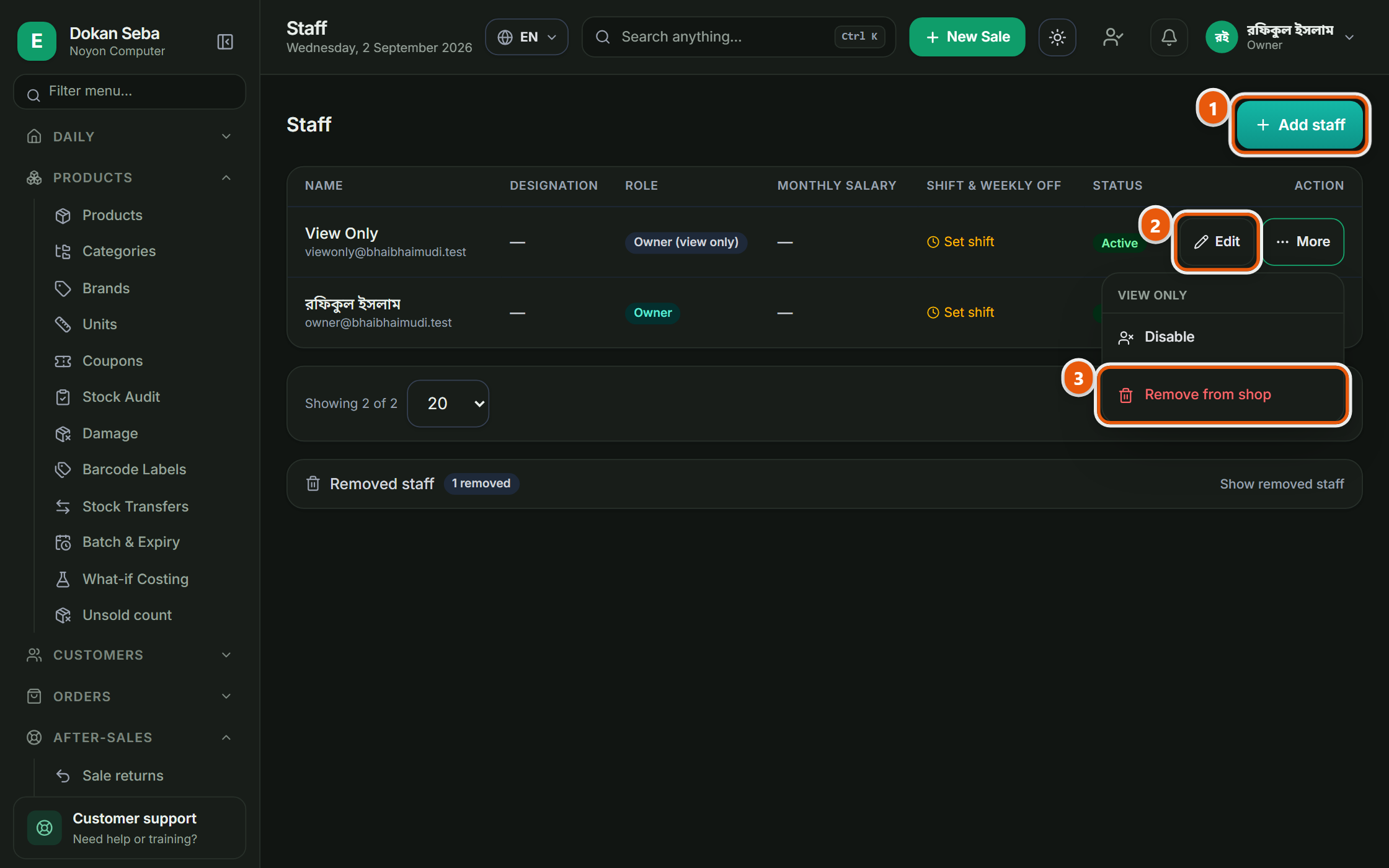
বাঁ পাশের মেনুতে স্টাফ → স্টাফ। প্রত্যেকের নিজের আলাদা লগইন দিন, একটা লগইন সবাই মিলে ব্যবহার করবেন না। আলাদা লগইন থাকলে কোন বিক্রি কে করেছে আর কে কোন পণ্য কত দামে বিক্রি করেছে সেটা পরে দেখা যায়।Staff → Staff in the left menu. Give each person their own login rather than sharing one. Separate logins are what let you see later who sold what, and at what price.
যতটুকু দরকার ততটুকুই অনুমতিGive only the permission needed
রোল দিয়ে ঠিক করে দিন কে কী পারবে। যে অনুমতি দেওয়া হয়নি সেই মেনুটা তার তালিকাতেই আসবে না, তাই যে জিনিস তার কাজে লাগে না, সেটা নিয়ে তার প্রশ্নও থাকবে না। কেনা দাম আর লাভের সংখ্যা আলাদা করে লুকিয়ে রাখা যায়।Roles decide what each person can do, and a menu they have no permission for does not appear for them at all, so what they do not need is not something they can wonder about. Cost prices and profit figures can be hidden separately.
কেউ চলে গেলেWhen someone leaves
কর্মচারী চলে গেলে তাকে মুছে ফেলবেন না, বন্ধ করে দিন। মুছে ফেললে তার করা পুরনো বিলগুলোর সাথে নামটা আর জোড়া থাকে না; বন্ধ করলে সে আর ঢুকতে পারে না, কিন্তু ইতিহাস ঠিক থাকে।When someone leaves, switch them off rather than deleting them. Deleting breaks the link between their name and the bills they made; switching off stops them signing in while the history stays intact.