

হোয়াটসঅ্যাপ বিজনেসWhatsApp Business
দোকানের নিজের হোয়াটসঅ্যাপ বিজনেস নম্বর থেকে বিল আর খবর পাঠানো।Sending bills and updates from the shop's own WhatsApp Business number.
সহায়িকার সূচিGuide index
কোথায় পাবেনWhere to find it কাস্টমারCustomers → হোয়াটসঅ্যাপWhatsApp Standard প্যাকেজ থেকেFrom Standard
কোথায় পাবেনWhere to find it
বাঁ পাশের মেনুতে কাস্টমার → হোয়াটসঅ্যাপ। এসএমএস-এর ঠিক নিচেই, কারণ কাজটা একই, যে ক্রেতা কাউন্টারে দাঁড়িয়ে নেই তার কাছে পৌঁছানো। মেনুতে এটা না দেখলে আপনার প্যাকেজে সুবিধাটা নেই; সাপোর্টে জানান।In the left menu: Customers → WhatsApp. It sits right below SMS because it is the same job: reaching a customer who is not standing at the counter. If you cannot see it in the menu, your package does not include it; tell support.
 ছবিতে চাপ দিলে বড় হবেTap the picture to enlarge
 নিজের নম্বর যুক্ত করুনConnect your own number
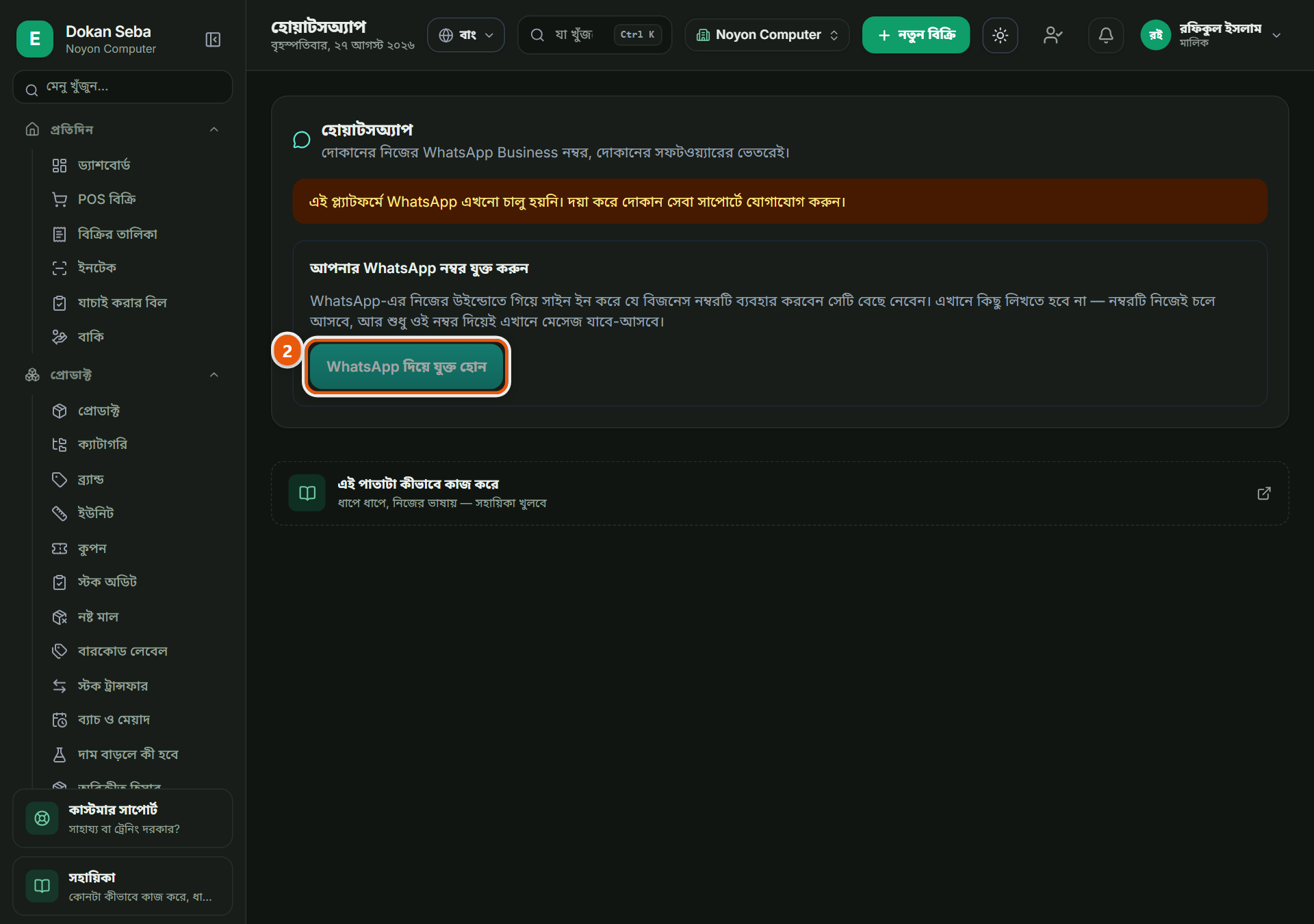
"WhatsApp দিয়ে যুক্ত হোন"-এ চাপ দিলে WhatsApp-এর নিজের পাতা খুলবে, সেখানেই অনুমতি দিতে হয়। দোকানের নিজের নম্বর থেকেই কথা হবে, আলাদা কোনো নম্বর নয়। "এখনো যুক্ত হয়নি" লেখা থাকলে এই ধাপটাই বাকি; আর "চালু নয়" জাতীয় কিছু দেখলে সেটা আমাদের দিকের ব্যাপার, আপনার ভুল নয়, সাপোর্টে জানান।Press "Connect with WhatsApp" and WhatsApp's own page opens for you to approve it. Conversations then run on your shop's own number, not a separate one. "Not connected yet" means this step is still pending; if you instead see that it is not switched on, that is our side rather than anything you did: tell support.
পড়ুন আর উত্তর দিনRead and reply
বাঁ পাশে কথোপকথনের তালিকা, একটাতে চাপ দিলে ডান পাশে পুরো কথা খুলবে। নিচের ঘরে লিখে "পাঠান" চাপুন। ছবি বা ফাইল এলে সেটাও এখানেই দেখা যায়।Conversations are listed on the left; pick one and it opens on the right. Type in the box below and press Send. Pictures and files a customer sends show up here too.
আগে থেকে কতজনকে মেসেজ দিতে পারবেনHow many you may message first
যে ক্রেতা আগে আপনাকে লিখেছে তাকে উত্তর দেওয়ায় কোনো সীমা নেই। কিন্তু আপনি নিজে থেকে আগে কতজনকে মেসেজ দিতে পারবেন সেটার দৈনিক সীমা আছে, এটা WhatsApp-এর নিয়ম, আমাদের নয়। পাতার উপরে আজকের সীমা লেখা থাকে।Replying to a customer who wrote to you first has no limit. Starting a conversation yourself does: there is a daily cap, set by WhatsApp and not by us. The current one is shown at the top of the page.
নম্বরের অবস্থা দেখে রাখুনKeep an eye on number health
"নম্বরের অবস্থা" দেখায় WhatsApp আপনার নম্বরকে কীভাবে দেখছে। অনেকে মেসেজ ব্লক করলে বা রিপোর্ট করলে এটা খারাপ হয় এবং দৈনিক সীমা কমে যায়। যাদের সাথে ব্যবসা আছে শুধু তাদেরই আগে মেসেজ দিন।"Number health" is how WhatsApp currently rates your number. It drops if people block or report your messages, and the daily cap drops with it. Only message people you actually do business with.
সংযোগ খুলে নেওয়াDisconnecting
যেকোনো সময় "সংযোগ বিচ্ছিন্ন করুন" দিয়ে খুলে নিতে পারেন, জিজ্ঞেস করে নিশ্চিত হওয়ার পরেই হবে। খুলে নিলে নতুন মেসেজ আর এখানে আসবে না; নম্বরটা আপনারই থাকে।You can disconnect at any time, and it asks you to confirm first. After that new messages stop arriving here. The number stays yours throughout.
অন্য যেসব দোকানেও এটা আছেThe other trades that get this
কম্পিউটার দোকানComputer shop · হার্ডওয়্যার ও রঙের দোকানHardware & paint · জুতার দোকানShoe shop · মুদি দোকানGrocery shop · ফার্মেসিPharmacy · মোবাইল শপMobile shop · কাপড় ও ফ্যাশনClothing & fashion · পাইকারি ও ডিস্ট্রিবিউশনWholesale & distribution · বেকারি ও কনফেকশনারিBakery & confectionery · কৃষি উপকরণ ও শস্যAgri inputs & grain · বাইক এক্সেসরিজ ও সার্ভিসিংBike accessories & service · ইলেকট্রনিক্স শপElectronics shop · ডিপার্টমেন্টাল স্টোরDepartmental store · কসমেটিকস দোকানCosmetics shop · পোল্ট্রি দোকানPoultry shop · অটো মোটর ও সার্ভিসAuto motors & service · বই ও স্টেশনারি দোকানBook & stationery shop · ফার্নিচার দোকানFurniture shop · জুয়েলারি দোকানJewellery shop · অন্যান্যOther
রেস্টুরেন্ট ও ক্যাফে-এর সব কাজ দেখুনAll the jobs for Restaurant & Cafe