

পণ্য যোগ করা ও স্টকAdding products and stock
নতুন পণ্য তোলা, কেনা-বিক্রির দাম বসানো, আর স্টক কত আছে সেটা দেখা। বারকোড স্ক্যান করলে নম্বর নিজেই বসে যায়, আর কম পড়লে পণ্যটা রিঅর্ডারের তালিকায় চলে আসে।Adding a product, setting its cost and selling price, and seeing the stock left. A barcode scan fills the number in, and low stock shows in the reorder list.
সহায়িকার সূচিGuide index
 ছবিতে চাপ দিলে বড় হবেTap the picture to enlarge
বাঁ পাশের মেনু থেকে প্রোডাক্টProducts, from the left menu
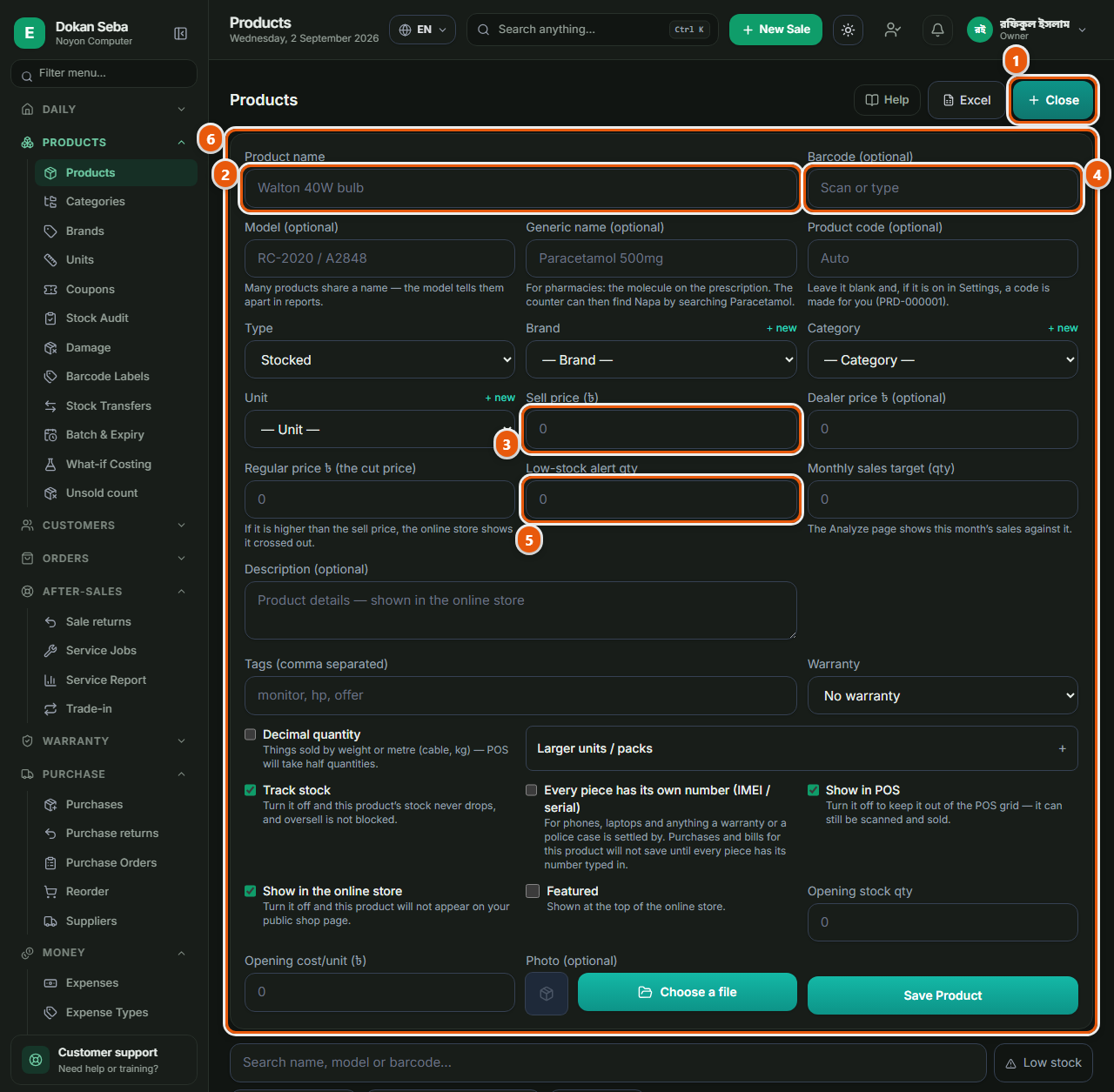
বাঁ পাশের মেনুতে "প্রোডাক্ট"-এ চাপ দিন। এখানে আপনার সব পণ্যের তালিকা থাকে। উপরে ডান দিকে নতুন পণ্য যোগ করার বোতামটা আছে, সেটায় চাপ দিলে একটা ফরম খুলবে। প্রথমবার তালিকা খালি থাকবে, সেটাই স্বাভাবিক।Tap "Products" in the left menu. This is the list of everything you sell. The button for adding a new one is at the top right; tapping it opens a form. The list is empty the first time, which is normal.
নাম আর ইউনিট, যেভাবে মুখে বলেনName and unit: the way you say it
নামের ঘরে যেভাবে মুখে বলেন সেভাবেই লিখুন, "লাক্স সাবান ১০০ গ্রাম", "হাফ হাতা শার্ট সাদা"। কাউন্টারে এই নাম দিয়েই খুঁজবেন, তাই বইয়ের ভাষায় লিখলে পরে নিজেরই খুঁজে পেতে অসুবিধা হবে। তারপর ইউনিট বেছে নিন, পিস, ডজন, কেজি নাকি ফুট। ইউনিট ভুল হলে স্টকের সংখ্যা কোনোদিন মিলবে না, তাই এটা শুরুতেই ঠিক করে নিন।Write the name the way you say it out loud: "Lux soap 100g", "Half sleeve shirt white". This is what you will search at the counter, so a formal name only makes it harder for you later. Then pick the unit: piece, dozen, kg or foot. A wrong unit means the stock count will never add up, so settle it now.
দুইটা দাম: কেনা আর বিক্রিTwo prices: cost and selling
কেনা দামের ঘরে লিখুন কত টাকায় আপনি কিনেছেন, আর বিক্রির দামের ঘরে কত টাকায় বেচবেন। ধরুন সাবান কিনেছেন ৪২ টাকায়, বেচবেন ৫৫ টাকায়, দুইটাই বসান। ⚠ কেনা দাম খালি রাখলে রিপোর্টে লাভের ঘরে ভুল সংখ্যা আসবে, কারণ লাভ বের হয় কেনা দাম থেকে। অনেকে তাড়াহুড়ায় শুধু বিক্রির দাম দেন, আর পরে অবাক হন যে লাভের হিসাব মিলছে না। কর্মচারী যেন কেনা দাম দেখতে না পায় সেটা স্টাফের অনুমতি থেকে বন্ধ করা যায়।Put what you paid in the cost field and what you charge in the selling field. Say the soap cost you ৳42 and you sell it at ৳55: enter both. ⚠ Leave the cost blank and the profit column in your reports will be wrong, because profit is worked out from it. People often fill in only the selling price in a hurry and are then surprised the profit does not add up. Staff can be stopped from seeing cost prices in their permissions.
বারকোড আর হাতে কত আছেBarcode, and how many you have
পণ্যের গায়ে বারকোড থাকলে বারকোডের ঘরে কার্সার রেখে স্ক্যানার দিয়ে স্ক্যান করুন, সংখ্যাটা নিজে থেকেই বসে যাবে, হাতে টাইপ করতে হবে না। বারকোড না থাকলে ঘরটা খালি রাখুন, নাম দিয়েই খোঁজা যাবে। এরপর "স্টক" বা "কত আছে"র ঘরে এই মুহূর্তে দোকানে হাতে যতটা আছে সেই সংখ্যাটা বসান। এটাই শুরুর হিসাব; এরপর প্রতিটা বিক্রিতে কমবে আর প্রতিটা মাল তোলায় বাড়বে, আপনাকে আর হাত দিতে হবে না।If the item has a barcode, put the cursor in the barcode box and scan it: the number fills itself and you do not type it. No barcode, leave it empty; the name search works. Then put today’s actual count into the stock box. That is your starting figure; every sale lowers it and every purchase raises it after that, with nothing more from you.
শেষ হওয়ার আগেই খবর পানBe warned before it runs out
সবচেয়ে কম কত থাকলে আপনি নতুন করে আনবেন, সেই সংখ্যাটা বসিয়ে দিন, যেমন সাবানের ক্ষেত্রে ১০। স্টক ১০-এর নিচে নামলেই পণ্যটা রিঅর্ডারের তালিকায় চলে আসবে। এতে কোনটা ফুরিয়ে আসছে সেটা মনে রাখতে হয় না, আর সাপ্লায়ার এলে কী কী আনতে হবে তার তালিকা তৈরিই থাকে।Enter the level at which you would reorder: say ten pieces for the soap. The moment stock falls below it, the product appears in the reorder list. You stop having to remember what is running low, and the list is ready-made for when the supplier comes.
সেভ করে একবার মিলিয়ে নিনSave, then check it once
সেভ করার পর তালিকায় পণ্যটা দেখতে পাবেন। এখানে একবার চোখ বুলিয়ে নিন, নাম, দাম আর সংখ্যা ঠিক আছে কিনা। কিছু ভুল হলে পণ্যটায় চাপ দিয়ে বদলে নেওয়া যায়, নতুন করে বানাতে হয় না। একই পণ্য দুইবার তুলে ফেললে স্টক দুই জায়গায় ভাগ হয়ে যাবে, তাই তোলার আগে তালিকায় খুঁজে দেখে নেওয়া ভালো।After saving, the product appears in the list. Glance at it once: name, prices and count. Anything wrong can be corrected by tapping the product; you do not create it again. Adding the same product twice splits its stock across two entries, so search the list before adding.