

ইনটেক: এক স্ক্যানেই ফেরত আর ওয়ারেন্টিIntake: returns and warranty in one scan
কাস্টমার কিছু নিয়ে ফিরে এলে এখানে স্ক্যান করলেই সব বেরিয়ে আসে।When a customer comes back with something, one scan here brings up everything about it.
সহায়িকার সূচিGuide index
যা ফিরে এসেছে সেটা স্ক্যান করুনScan whatever came back
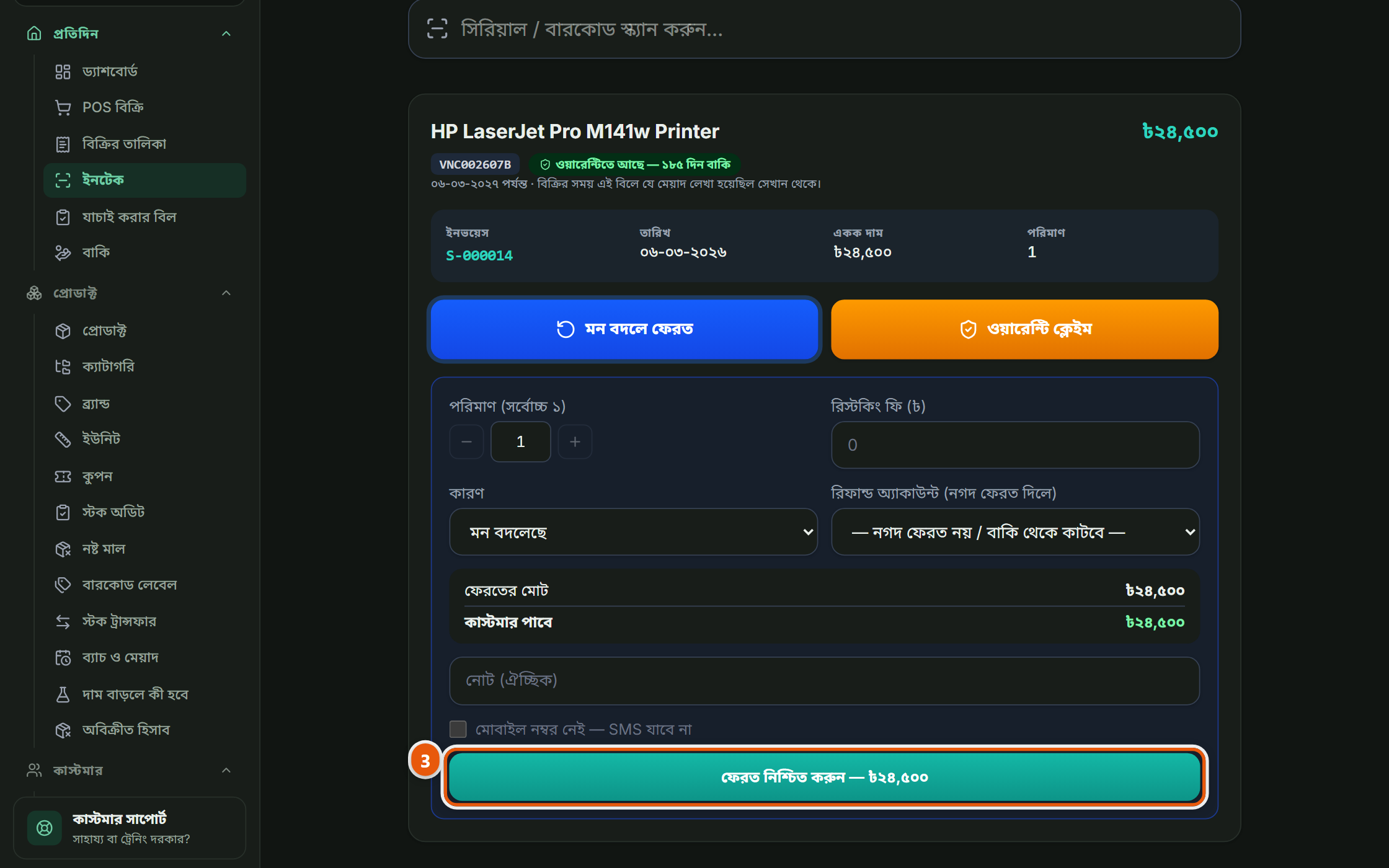
মেনু থেকে "ইনটেক"। কাস্টমার হাতে যা নিয়ে এসেছে (বারকোড বা সিরিয়াল) সেটা স্ক্যান করুন, নয়তো নম্বরটা লিখে দিন। কোন বিলে কবে বিক্রি হয়েছিল, কে কিনেছিল, ওয়ারেন্টি আছে কিনা, সব একসাথে চলে আসবে। আলাদা করে বিল খুঁজতে হয় না।Open "Intake" from the menu and scan what they are holding (the barcode or the serial) or type the number. Which bill it was sold on, when, to whom, and whether it is still in warranty all come up together. You do not go hunting for the bill.
ওয়ারেন্টি আছে কিনাWhether it is still covered
তিনটে উত্তরের একটা পাবেন: ওয়ারেন্টি আছে, মেয়াদ শেষ, অথবা "জানা নেই"। ⚠ "জানা নেই" মানে মেয়াদ শেষ নয়, মানে ওই পণ্যের ওয়ারেন্টির সময়টা কেউ কোনোদিন লিখে রাখেনি। এই দুইটা গুলিয়ে ফেলে কাস্টমারকে ফিরিয়ে দেওয়াটাই এখানে সবচেয়ে বড় ভুল।You get one of three answers: covered, the term has run out, or "nothing on record". ⚠ "Nothing on record" is NOT the same as expired: it means nobody ever recorded a warranty term for that product. Confusing the two and turning a customer away is the worst mistake this screen can lead to.
 ছবিতে চাপ দিলে বড় হবেTap the picture to enlarge
এখান থেকেই সিদ্ধান্ত নিনAct from here
ফেরত নেবেন, বদলে দেবেন, নাকি কোম্পানিতে পাঠাবেন, এখান থেকেই করা যায়। যেটাই করুন, স্টক আর কাস্টমারের খাতা নিজে থেকেই ঠিক হয়ে যায়, আলাদা করে কোথাও লিখতে হয় না।Take it back, exchange it, or send it to the company: all from here. Whichever you choose, the stock and the customer’s ledger correct themselves; there is nothing to write down separately.