

কাস্টমার আর তাদের বাকিCustomers and their dues
কাস্টমার যোগ করা, কার কত বাকি দেখা, আর টাকা আদায় করা। জমা পুরনো বাকি থেকে নিজে থেকেই কাটে, আর বাকির খাতা থেকে সরাসরি মনে করিয়ে দেওয়ার বার্তা পাঠানো যায়।Adding customers, seeing who owes what, and collecting it. A payment comes off the oldest dues by itself, and reminders go out in your shop’s name.
সহায়িকার সূচিGuide index
 ছবিতে চাপ দিলে বড় হবেTap the picture to enlarge
কাস্টমার যোগ করুনAdd the customer
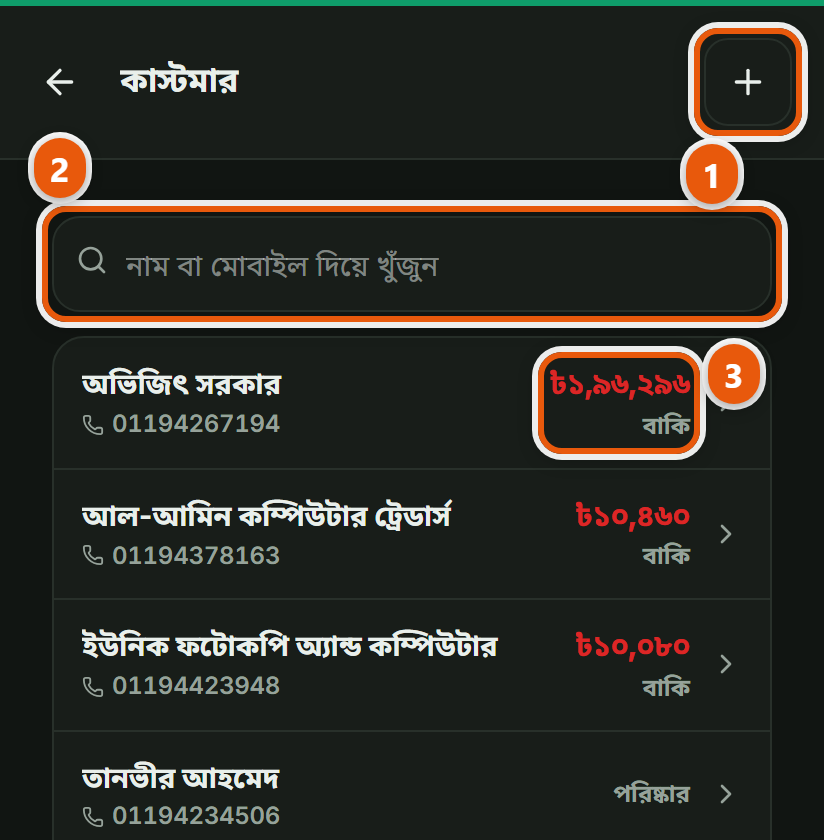
বাঁ পাশের মেনু থেকে "কাস্টমার"-এ গিয়ে নতুন কাস্টমার যোগ করুন। নাম আর মোবাইল নম্বর, এই দুইটাই যথেষ্ট, বাকিটা পরে দিলেও চলে। ⚠ নম্বরটা বাদ দেবেন না: রসিদ পাঠানো, বাকির কথা মনে করিয়ে দেওয়া, সবই ওই নম্বর দিয়ে হয়। নম্বর ছাড়া কাস্টমার মানে ওই লোকটার সাথে যোগাযোগের কোনো পথ নেই। বিক্রির সময়েও কাস্টমার যোগ করা যায়, বিল ছেড়ে এখানে আসতে হয় না।Open "Customers" in the left menu and add a new one. A name and a mobile number are enough; the rest can wait. ⚠ Do not skip the number: sending a receipt and chasing dues both run on it, and a customer without one is somebody you have no way to reach. You can also add a customer while making a bill, without leaving the till.
একই লোক দুইবার যেন না ওঠেDo not let one person become two
নতুন কাস্টমার যোগ করার আগে নম্বর দিয়ে একবার খুঁজে দেখুন। একই লোক দুইবার উঠে গেলে তার বাকিও দুই জায়গায় ভাগ হয়ে যাবে (একটাতে ৫০০ টাকা, আরেকটাতে ৩০০) আর আপনি কোনোটাতেই আসল হিসাব দেখতে পাবেন না। নামের বানান একটু এদিক-ওদিক হলেও নম্বর এক থাকে, তাই নম্বর দিয়ে খোঁজাই নিরাপদ।Search by number before adding anybody. One person entered twice means their dues split across two ledgers (৳500 on one, ৳300 on the other) and neither shows you the truth. Spellings of a name vary; the number does not, so search on that.
কার কত বাকিWho owes what
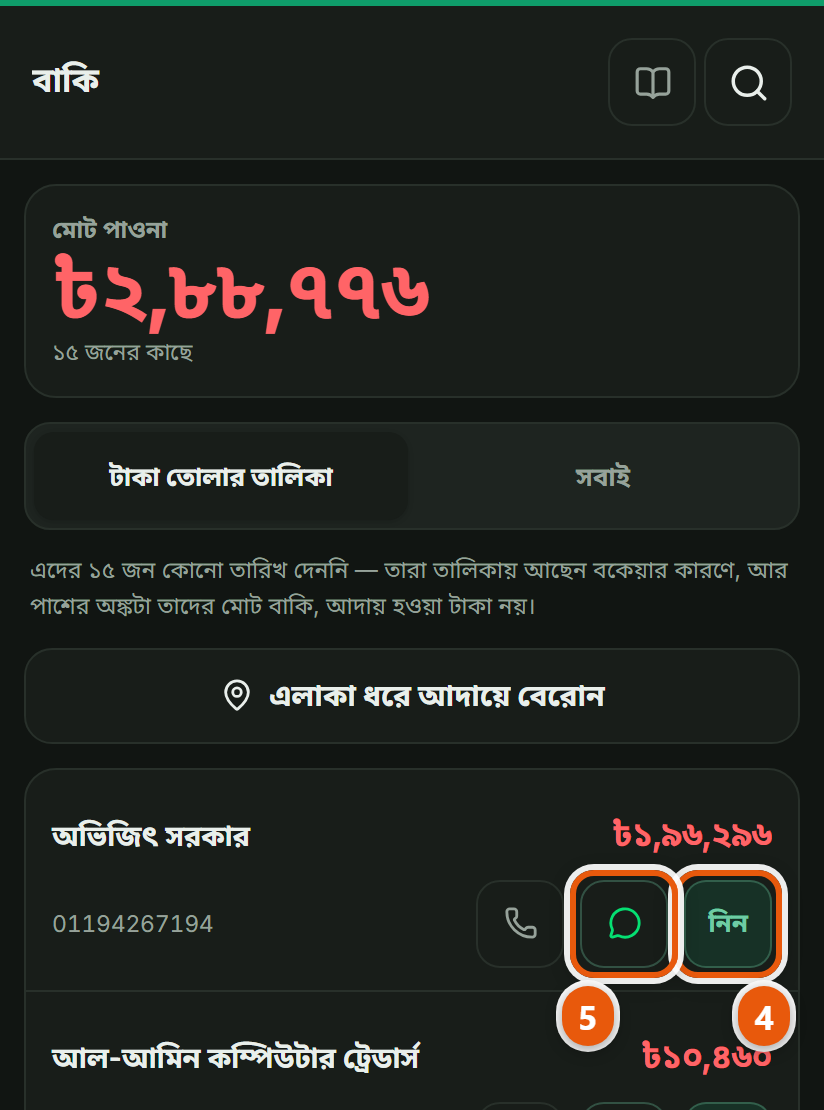
কাস্টমারের পাতায় গেলে তার সব বিল, কত দিয়েছে আর কত বাকি, সবই এক জায়গায়। বাকির খাতায় সবার বাকি একসাথে দেখা যায়, আর কার বাকি কত পুরনো সেটাও।A customer’s page shows every bill, what they have paid and what is left, in one place. The dues screen shows everyone’s together, and how old each one is.
 ছবিতে চাপ দিলে বড় হবেTap the picture to enlarge
টাকা জমা নিনRecord a payment
কাস্টমার টাকা দিলে তার পাতা থেকে জমা দিন, কোন বিলের বিপরীতে সেটা বলে দিতে হয় না, পুরনো বাকি থেকে নিজে থেকেই কাটবে। জমা দেওয়ার পর চাইলে কাস্টমারকে খুদে বার্তায় জানিয়ে দেওয়া যায়।When they pay, record it on their page: you do not have to say which bill it is against; it comes off the oldest dues by itself. You can text them the confirmation afterwards.
ঝগড়া ছাড়াই মনে করিয়ে দিনReminding without a quarrel
বাকির খাতা থেকে সরাসরি মনে করিয়ে দেওয়ার বার্তা পাঠানো যায়। লেখাটা আপনার দোকানের নাম নিয়েই যায়, আর কত টাকা কবে থেকে বাকি সেটা লেখা থাকে, মুখে বলার চেয়ে এটা অনেক সময় কাজে দেয়।Reminders can go straight from the dues screen. They carry your shop’s name and say how much has been outstanding since when, which often works better than saying it face to face.